DevOps
Cache clearing
Ibexa DXP contains multiple layer of caching that you can clear independently from each other:
Clear system cache
System cache is separate for every Symfony environment and stores information derivable from source code like compiled container, routes, or optimized classes.
To clear the system cache, execute the cache:clear command on every web server running Ibexa DXP.
To specify an environment, pass it by using either the --env option or the APP_ENV variable.
Both the examples below clear the system cache for the prod environment:
APP_ENV=prod php bin/console cache:clearphp bin/console cache:clear --env=prod
When neither the --env option nor the APP_ENV variable is set, cache:clear clears the system cache for the dev environment by default.
Don't run cache:clear as root as it can lead to issues with file ownership.
Symfony 7.4 behavior change
Starting with Symfony 7.4, running php bin/console cache:clear or rm -rf var/cache/* clears only the system cache, even when you use a filesystem-based cache pool for persistence cache.
You must always clear the persistence cache separately.
Clearing system cache manually
During development, you can clear the system cache manually by running:
1 | |
Don't clear system cache manually on production
Manually clearing the system cache doesn't warm up the cache, resulting in a significant performance drop on the first request. To avoid this, you must not clear the cache manually in a production environment.
Clear persistence cache
Persistence cache stores information about application data.
To clear the persistence cache, you must run:
1 | |
The default cache pool is named cache.tagaware.filesystem.
The default cache pool when running Redis or Valkey is named cache.redis.
If you customized the persistence cache configuration, the name of your cache pool might be different.
Clearing persistence cache manually
During development, when using a filesystem-based cache pool, you can clear the application cache by running:
1 | |
Clear HTTP cache
HTTP cache uses reverse proxies like Varnish or Fastly to store application responses controlled by HTTP Cache headers.
To clear the HTTP cache, see Purging from command line.
Web Debug Toolbar
As of Ibexa DXP v4.5, the Symfony Web Debug Toolbar is no longer installed by default. To install it, run the following command:
1 | |
After you have installed Symfony Web Debug Toolbar, it's available when running Ibexa DXP in the dev environment.
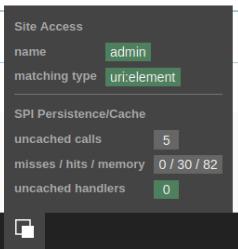
It's extended with some Ibexa DXP-specific information:
SPI (persistence)
This section provides the number of non-cached SPI calls and handlers. You can see details of these calls in the Symfony Profiler page.
SiteAccess
Here you can see the name of the current SiteAccess and how it was matched. For reference see the list of possible SiteAccess matchers.
Logging and debug configuration
Logging in Ibexa DXP consists of two parts. One are several debug systems that integrate with Symfony developer toolbar to give you detailed information about what is going on. The other is the standard PSR-3 logger, as provided by Symfony using Monolog.
Debugging in dev environment
When using the Symfony dev environment, the system tracks additional metrics for you to be able to debug issues.
They include Symfony cache use, and a persistence cache use.
Reducing memory use
Tip
For long-running scripts, see Long-running console commands.
If you're running out of memory and don't need to keep track of cache hits and misses, you can disable persistence cache logging, represented by the setting parameters.ibexa.spi.persistence.cache.persistenceLogger.enableCallLogging. In config_dev.yaml:
1 2 | |
Error logging and rotation
Ibexa DXP uses the Monolog component to log errors, and it has a RotatingFileHandler that allows for file rotation.
According to their documentation, it "logs records to a file and creates one logfile per day. It also deletes files older than $maxFiles".
Monolog's handler can be configured in config/packages/<environment>/monolog.yaml:
1 2 3 4 5 6 7 | |
Using logrotate
Monolog themselves recommend using logrotate instead of doing the rotation in the handler, because it gives better performance.